Homelab note This post documents a bug bounty lab that I built using AI, all on hardware I own. The target is something I created myself, and I control the network segment. The key point isn’t that “AI finds bugs”; it’s about the engineering judgment involved, and how the model would have misled me if I had fully relied on it.
I ran an AI-driven recon tool on a self-hosted LLM, using hardware I own, against a target I built. I treated the model as a suspect, not as an oracle.
TL;DR
I set up an AI-assisted bug bounty tool called BugHunter, connecting it to a local LLM (Qwen 3 on Ollama) on my GPU. I did this from a Kali attack VM and pointed it at a self-hosted ClassicPress target on a segment I control. Everything that went wrong along the way taught me more than the hunting itself. The recurring lesson is that a local model is a fast, tireless lead generator whose output you must manually verify, not a source of truth. This write-up focuses on engineering judgment, not a magic-button demo.
Why local AI at all
Most AI-assisted security tools send everything to a cloud model. For my learning lab, I purposely chose to do the opposite for three reasons:
- Privacy and control. Recon output and target details never leave my network.
- Cost. Agentic loops consume tokens; local inference is free after the download.
- Staying involved. This is the most important reason. As someone working toward OSCP, the last thing I want is a black box that gives me findings I don’t understand. A local model with clear limitations forces me to review every step, which builds the skills I want.
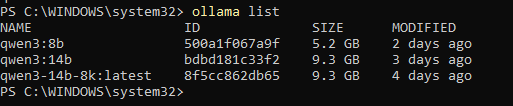
A local model around 14B is much weaker than a leading cloud model at multi-step reasoning, and on consumer hardware you’re limited on context. I wasn’t after the best output; I was establishing a workflow I could understand from start to finish.
The architecture
Three machines on a VMware NAT segment:
  Windows host (RTX 4070, 12 GB) ── Ollama :11434 (Qwen 3, on the GPU)
        │  VMware NAT (VMnet8)
        ├── Kali VM ...... ATTACKER  (BugHunter, wpscan, nuclei)
        └── Ubuntu 24.04 .. TARGET   (LAMP + ClassicPress 2.7.0)
NAT is easy to misrepresent, so to be exact: the target isn’t reachable from my LAN or from the internet, but NAT does give the VMs outbound access. That’s intentional, because I want package updates and tool installations to work, but it doesn’t provide strict isolation. Choosing host-only would limit outbound access, making the setup more complicated.
Inference runs on the Windows GPU, while the Kali box simply orchestrates tools and communicates with Ollama over the network. No GPU passthrough is required. The attacker and target are separate machines on purpose; you should never test from the same box that you’re attacking, and a vulnerable target should never be reachable from where it shouldn’t be.
The build — and what actually broke
I won’t cover the parts that went smoothly. The problems are the interesting part.
1. Getting cross-host inference to work
Ollama binds to 127.0.0.1 by default, so right out of the box, the Kali VM
couldn’t access it. The fix is to set OLLAMA_HOST=0.0.0.0:11434 and restart the
service. But this is where mistakes happen: the environment variable only applies
to processes that start fresh, and Ollama’s server runs in the background. You
must completely quit and relaunch it, not just close a terminal.
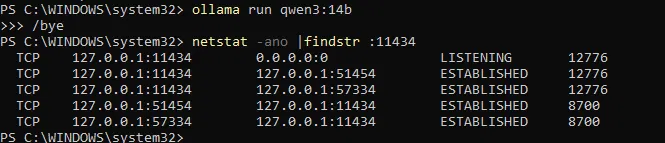
This verification step taught me how to read netstat properly:
TCP   127.0.0.1:11434   0.0.0.0:0   LISTENING
      ^ Local Address   ^ Foreign Address (always 0.0.0.0 for a listener — ignore it)
The 0.0.0.0 you want has to show up in the Local column on the left. I
mistakenly thought the Foreign address meant success. After the proper restart,
it displayed 0.0.0.0:11434 on the left, and Kali could access it.
I set the Windows firewall rule to the VM subnet only
(remoteip=<nat-subnet>/24), not to Any — the Ollama endpoint has no
authentication, so an open port there is a real exposure, not just a lab
convenience.
For next time, I’d take a tighter approach: instead of binding to 0.0.0.0 and
relying on a firewall to limit access, I would bind Ollama directly to the VMnet8
host adapter address (OLLAMA_HOST=192.168.x.1:11434). This way, the listener
wouldn’t exist on the LAN-facing interface at all, turning the firewall rule into
an additional layer of security.

Lesson: Understand your VM networking, and don’t trust a configuration change until you’ve verified the actual listening state — not just the command’s exit code.
2. Reading the tool’s source instead of guessing
BugHunter automatically selects a model and sets a context window internally. Instead of treating it as a black box, I read the source code. Two constants stood out:
- A
MODEL_PRIORITYlist that picks the highest-ranked installed model. - A hardcoded
MAX_CTXthat controls the context window sent to Ollama.
Knowing these allowed me to fix the next issue more effectively instead of struggling. It’s a small detail, but “read the tool before you fight it” saved me hours.
Lesson: Tools are just code. When something surprises you, the answer is often in the source, not in a forum thread.
3. The VRAM wall — the one I’m proudest of
During my first real run, I checked ollama ps while it was executing:
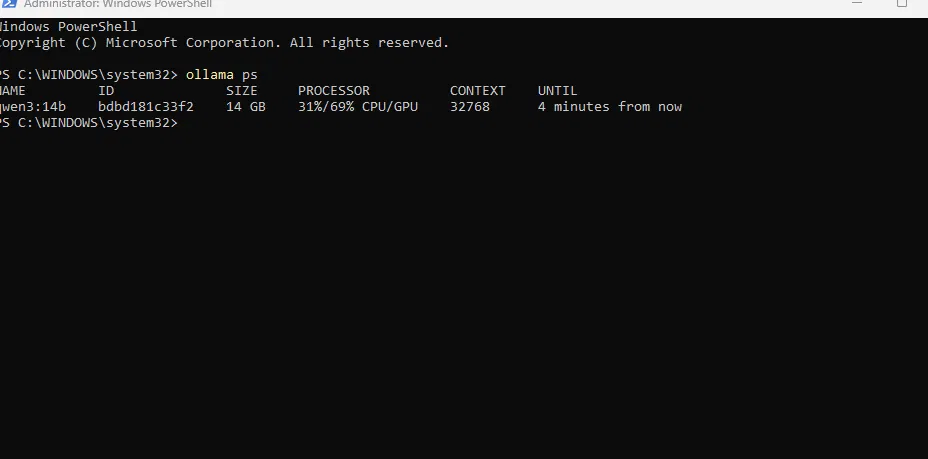
31%/69% CPU/GPU means the model wasn’t fully on the GPU; almost a third of it
spilled onto the CPU, reducing throughput. The cause was the CONTEXT value: the
tool requested a 32K window, and on a 12 GB card, it couldn’t fit alongside a
9.3 GB 14B model.
The quick math: a 32K KV cache for that model is around ~5 GB. Add the 9.3 GB of weights, and you exceed the ~11 GB of usable VRAM, leading Ollama to offload layers to system RAM. That’s what caused the spillover.
The fix wasn’t obvious. Reducing the context to 8K so the 14B model fits is actually wrong for my workload: BugHunter’s analysis phase requires the complete recon dump for reasoning. Cutting the window to 8K means the model can’t see half the data. So I chose to switch to the 8B model, which can handle the full 32K window entirely on the GPU:
- 14B @ 8K context → smarter model, but reasoning over half the evidence.
- 8B @ 32K context → less capable model, but sees all the evidence and runs
100% GPU.
For my needs of “read this pile of recon output and reason about it,” context
outweighed raw capability. I adjusted the model-priority list to select the 8B
model, kept the full context, and checked ollama ps again:

Lesson: Measure, don’t assume. The “best” model isn’t necessarily the largest one; it’s the one that fits the actual constraints of the workload, which in this case was context, not parameters.
4. A clean pipeline pointed at nothing
With the model functioning properly, I initiated the hunt. The brain connected to Ollama and started recon analysis against the target:

But all I got back was:

Everything worked. That was the trap. BugHunter is designed for internet-facing domains and checks the web root; my ClassicPress install was in a subdirectory, so the tool analysed an empty Apache default page and rightfully reported nothing. A green, error-free run that tells you absolutely nothing looks a lot like success if you aren’t paying attention.
Moving the app to the web root exposed a second bug — the site returned a 404 error. The Apache error log clearly stated:
AH00112: Warning: DocumentRoot [/var/www/html/classicpress/classicpress] does not exist

It was a duplicated path — I had run a sed substitution twice. I set it
explicitly, reloaded, and curl -I returned a 200 status, confirming the site
was accessible.

Lesson: Successfully running against the wrong target is worse than encountering an error, because it’s silent. Always double-check that the tool is examining what you expect it to. Also, read the logs; they usually provide clear answers.
Where the AI helped and where it would have misled me
The honest version matters more to me than the hype.
Where a local model genuinely helped:
- Orchestrating a multi-tool recon pipeline and summarising the combined output into something readable.
- Drafting notes, structure and first-pass write-ups, where I act as the editor.
- Bounded, human-in-the-loop tasks that I can sanity-check straight away.
Where it would have misled me, if I had taken it at face value:
- Confident false positives. The triage and validation step will pass things through as “findings” that don’t hold up. Treat that as a verdict and you lose an afternoon, or worse, you put rubbish in a report.
- Silent empty results. As above: reading “nothing to interpret” as “the target is clean” would have been completely wrong.
- Reduced reliability under load. Small models get less consistent over long agentic loops, which is exactly when you’re most tempted to stop watching.
The thread running through the whole build is that the model is a lead generator, not an oracle. Every finding it produces is a hypothesis that I reproduce by hand before I treat it as real. That isn’t a limitation I need to apologise for. On an OSCP track it’s the whole point: the tool that makes me verify is teaching me more than the one that doesn’t.
What I’d tell someone building this
- Run inference where the GPU is, orchestrate from your attack box, and keep them as separate machines on a segment nothing else can reach.
- Be clear about what your network setup actually gives you. NAT keeps the target unreachable from outside but still allows outbound traffic; host-only cuts both. Claiming more isolation than you have is an easy thing to get called out on.
- Verify listening state and connectivity explicitly, rather than trusting exit codes.
- Read the tool’s source. Model choice and context window are usually just constants you can change.
- On limited VRAM, context can matter more than model size. Check
ollama psduring a run, not after it. - A clean run against the wrong target is a silent failure, so confirm scope first.
- Treat every AI finding as unverified until you have reproduced it by hand.
Scope & ethics
Everything here ran against a target I built myself, on a network segment I control that nothing outside it can reach. No live systems, no third-party programs, and no real client data. Automated tooling that calls itself autonomous acts without stopping to ask, so it only ever gets pointed at in-scope bounty targets or gear I own. Knowing what not to point it at is part of the skill set.
Tools & credits
- BugHunter by shuvonsec — the AI-driven recon and hunting framework.
- Ollama + Qwen 3 (8B / 14B) — local inference.
- ClassicPress 2.7.0 — a WordPress-lineage CMS, used here as a self-hosted target.
- wpscan and nuclei — the purpose-built CMS tooling I rely on for the actual hunting. A WordPress-fork target is their home turf, path and all.
- VMware Workstation — the lab itself.
Next up: enumerating the CMS properly with wpscan and nuclei, including a plugin I spotted installed on the target, since plugin code is usually where the real attack surface lives on a WordPress-lineage CMS. After that, turning the raw findings into a repeatable manual methodology.